
This is the format:
rtsp://USERNAME:PASSWORD@DEVICE-IP:554/cam/realmonitor?channel=1&subtype=0The rest of this guide covers what those parts mean and why the stream sometimes refuses to open even when the URL looks right. The NVR case, which trips people up most, gets its own section.
What each part of the Dahua RTSP URL means
| Part | What it is | Typical value |
|---|---|---|
rtsp:// | The protocol. Always lower case. | rtsp:// |
USERNAME | A user account on the camera or recorder. | The account you log in with |
PASSWORD | That account's password. Special characters must be URL-encoded (see below). | Your password |
DEVICE-IP | The LAN IP address, or a DDNS hostname if you're outside the network. | 192.168.x.x |
554 | The RTSP port. 554 is the Dahua default. | 554 |
/cam/realmonitor | The live-view path. This never changes on Dahua hardware. | /cam/realmonitor |
channel= | The video channel. 1 on a single camera. On an NVR it is the channel slot the camera sits in. | 1 to 64 |
subtype= | 0 is the main stream. 1 is the sub stream. Some models expose 2 for a third stream. | 0 or 1 |
If you leave the username and password out of the URL, most players will prompt you for them. Leaving them out is safer when the URL will be visible on a screen or in a config file.
Main stream or sub stream: which one to request
Use subtype=0 for recording and for anything where you need the full resolution the camera was bought for. A 4 MP or 8 MP Dahua camera only delivers that detail on the main stream.
Use subtype=1 for live viewing on a wall of tiles, for a mobile-style preview, or for feeding an analytics engine that only needs 704x576 or D1. The sub stream is a fraction of the bandwidth and it's what keeps a 32-channel live view usable.
On a site with 40 or 50 cameras, pulling every main stream into a viewing client is the single most common reason a network feels slow. Pull sub streams for the grid and main streams only for the camera you've clicked into.
Example, camera at 192.168.1.64:
Main streamrtsp://admin:YourPass@192.168.1.64:554/cam/realmonitor?channel=1&subtype=0

Sub streamrtsp://admin:YourPass@192.168.1.64:554/cam/realmonitor?channel=1&subtype=1
RTSP URL for a camera connected through a Dahua NVR
You don't need the camera's own IP address. Point the URL at the NVR and set channel= to the slot number the camera occupies in the NVR's channel list.
Camera in NVR channel 7, main stream:
rtsp://admin:YourPass@192.168.1.108:554/cam/realmonitor?channel=7&subtype=0This matters on sites where the cameras sit on the NVR's own PoE ports. Those cameras are on a private subnet (usually 10.1.1.x) that the rest of the LAN can't reach directly, so the NVR is the only way to get their streams out. Where cameras run through external PoE switches instead, each camera keeps its own LAN address and can be reached either way.
The NVR must have RTSP enabled under Network > Port, and the account you use needs live-view permission for that channel. On larger recorders, check the channel is actually online before you blame the URL.
If you're sizing the NVR for a new site rather than pulling streams from an existing one, that's covered in the NVR storage sizing guide, not here.
Testing the stream in VLC
The fastest way to prove a URL works:
- Open VLC. Media > Open Network Stream.
- Paste the full URL including credentials.
- Click Play. Allow four or five seconds; the first keyframe has to arrive before the picture appears.
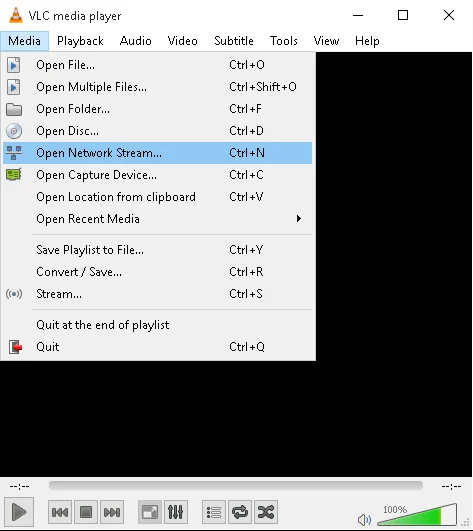
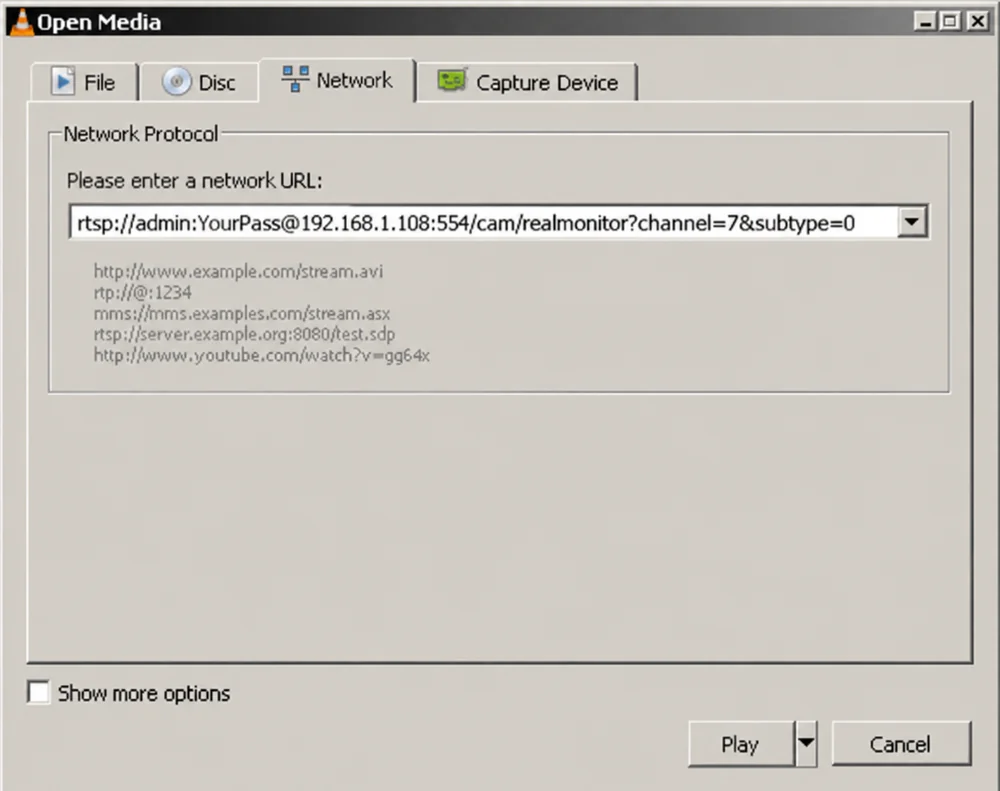
If VLC opens the stream, the URL is correct and any problem you had elsewhere is in the other application, not the camera.
For day-to-day remote viewing you would still use DMSS or SmartPSS, which handle the P2P connection for you. That workflow is in the DMSS and SmartPSS remote access guide.
Adding a Dahua stream to a third-party NVR or VMS
Most third-party recorders and VMS platforms offer two ways to add a Dahua camera: ONVIF or a manual RTSP URL.
Use ONVIF first. It carries the stream and the camera's events, PTZ control and time sync. On Dahua devices ONVIF is enabled under Network > Access Platform > ONVIF, and it needs its own ONVIF user created there. A common mistake is trying the admin account for ONVIF when no ONVIF user has been added yet.
Use the manual RTSP URL when the platform doesn't support ONVIF, when ONVIF discovery keeps failing across VLANs, or when you only need video. Some platforms label the fields "main stream URL" and "sub stream URL"; give them subtype=0 and subtype=1 respectively.
Some Dahua firmware also accepts an ONVIF-flavoured RTSP path:
rtsp://DEVICE-IP:554/cam/realmonitor?channel=1&subtype=0&unicast=true&proto=OnvifTry the standard path first. Only use this one if a platform specifically asks for it.
Snapshot URL
If the application wants a still image rather than a stream, Dahua exposes one over HTTP:
http://DEVICE-IP/cgi-bin/snapshot.cgi?channel=1Authentication is required and the HTTP port defaults to 80. This is useful for dashboards, ticketing systems and anything that polls for a JPEG every few seconds.
Why the Dahua RTSP stream won't open
These are the causes we see most often when a distributor customer in Oman calls about a stream that "used to work".
Special characters in the password
An @, #, %, & or / inside the password breaks the URL because the player reads it as part of the address. Encode the character: @ becomes %40, # becomes %23, & becomes %26, % becomes %25. Or leave the credentials out of the URL and let the player prompt.
Wrong RTSP port
554 is the default, but installers change it when a site has several devices behind one router. Check Network > Port on the device and use whatever is listed there.
RTSP or the sub stream is disabled
Newer firmware lets you switch off RTSP entirely, and the sub stream can be disabled under Camera > Encode. If subtype=0 works and subtype=1 doesn't, the sub stream is off.
Authentication mode
Under Network > Port some models let you choose Basic or Digest RTSP authentication. Older third-party software only speaks Basic. If you get a 401 error, switch the mode and try again.
Too many concurrent connections
Each Dahua device caps the number of simultaneous RTSP sessions, typically 10 to 20 depending on model. A viewing wall and a VMS together can hit that limit. Add a few phones and it will. Close sessions you don't need.
Firewall between subnets
Port 554 must be open from the client to the device, and the RTP media ports the device negotiates must not be blocked. Across a firewall, forcing RTSP over TCP in the player usually resolves it.
Camera behind an NVR is offline
If the URL points at the NVR and channel 7 shows no video, check channel 7 in the NVR's live view before troubleshooting the URL. A dead PoE port or a failed camera looks exactly like a bad URL from the outside.
Keep RTSP off the internet
Don't forward port 554 on the router to expose a camera or recorder to the internet. RTSP credentials travel in a form that's trivial to capture, and exposed Dahua ports are scanned constantly.
If a remote application needs the stream, put it behind a VPN or use the vendor's P2P path. And change the login on every device before it goes into service.
Dahua cameras and recorders for projects in Oman
Elite Infotech supplies Dahua IP cameras, NVRs and surveillance storage and PoE switches to system integrators and contractors across Oman, with stock in Muscat, Ruwi, Sohar and Salalah. Call +968 9690 9530 or browse the Dahua range.